A dieline (also spelled ‘die line’) in packaging is the flat production layout that shows where a box will be cut, folded, glued and printed.
Designers use it to place artwork correctly. Packaging suppliers use it to confirm the structure before sampling and production.
For custom boxes, the dieline should be based on the actual box size, material and structure rather than copied from a random online template.
What Is a Packaging Dieline?
The dieline shows every panel of a box in flat form before the material is folded into its final shape.
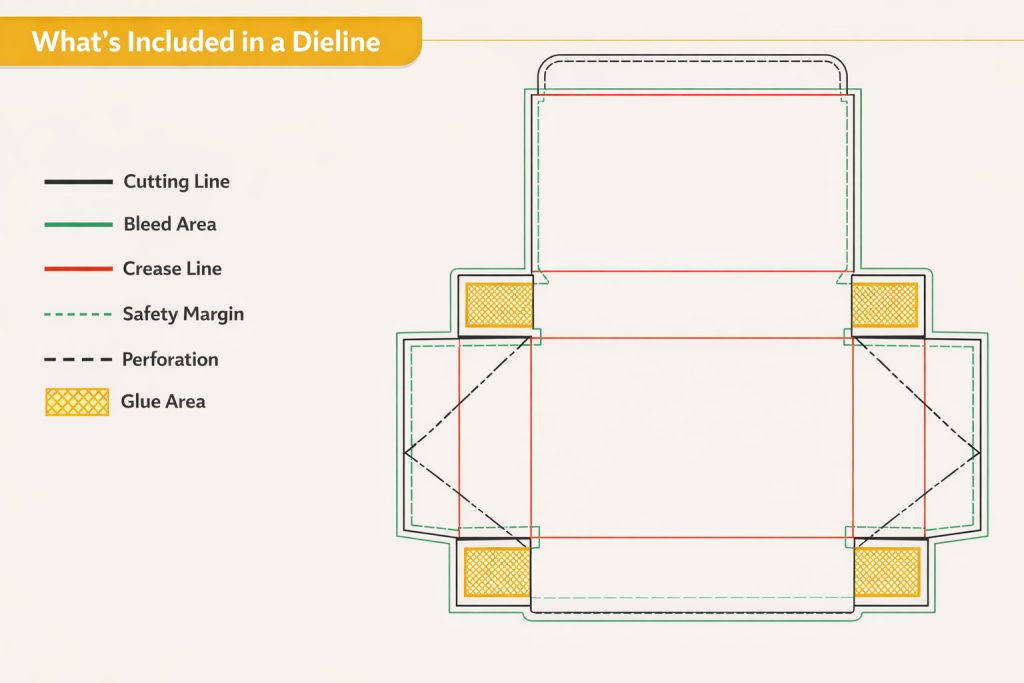
It normally includes:
- cut lines
- fold or crease lines
- bleed
- safety areas
- glue tabs
- perforation lines, when required
Once the structure is confirmed, artwork is placed on top of this layout.
The dieline is not the finished design itself. It is the technical base that tells the designer where artwork can go and tells production how the packaging should be formed.
How to Read a Packaging Dieline
The exact colors and line styles can vary between suppliers, so always check the file legend before editing.
The main elements are usually similar.
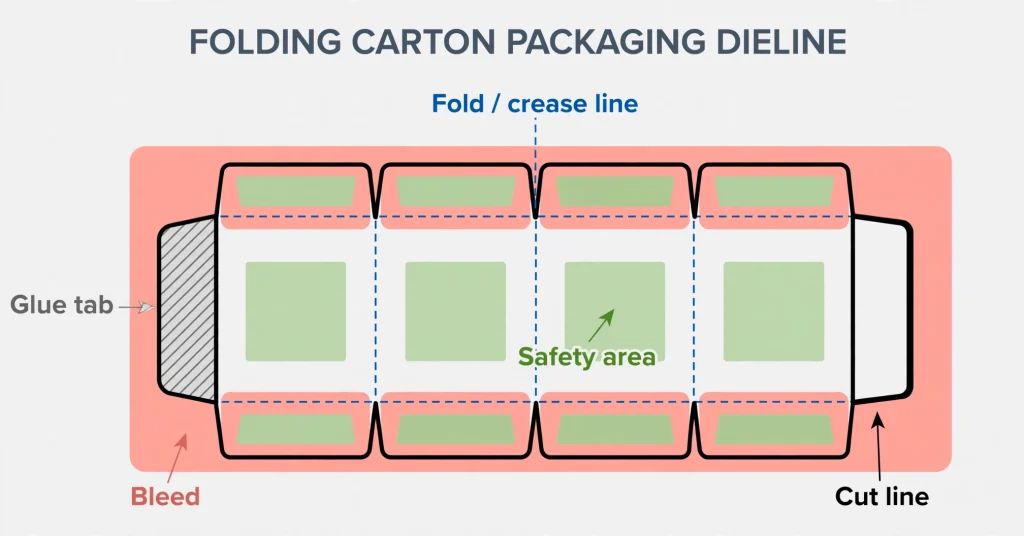
Cut Lines
Cut lines show where the material will be trimmed.
Anything outside the final cut area will not appear on the finished box.
Logos, barcodes and important text should not sit too close to these lines.
Fold Lines
Fold lines show where the board will crease and fold during assembly.
Artwork can cross a fold, but small text or detailed graphics should be positioned carefully because the crease can affect appearance.
Opening direction also depends on the fold layout, so this should be checked before artwork approval.
Bleed
Bleed extends background artwork beyond the cut edge.
This allows for small movement during cutting and helps prevent white edges around printed panels.
Background colors and full-panel images should normally continue into the bleed area.
Safety Area
The safety area keeps important content away from cutting and folding zones.
Product names, logos, legal text and barcodes should stay inside this area unless the design has been reviewed specifically for another position.
Glue Areas
Glue tabs are used to join parts of the box during assembly.
Important graphics should not be placed in these areas because they may be covered or affected by adhesive.
Perforation Lines
Perforations are used when part of the packaging needs to tear or separate.
They are common on tear-open structures, display packaging and some e-commerce boxes.
Dieline Examples for Different Box Structures
The layout changes with the box style.
Folding Carton
Folding cartons usually use one connected sheet with multiple panels, crease lines and at least one glue tab.
The artwork must follow the panel direction carefully because some sections may appear upside down in the flat file but become correct after folding.
Corrugated Mailer Box
Mailer box dielines often contain larger panels, locking flaps and several fold sections.
Inside printing may also be included, which means the designer needs to understand which panels become the lid, base and side walls after assembly.
For custom mailer boxes, flute direction and board thickness can also affect the final structure.
Rigid Box
Rigid packaging is different because it is not normally produced from one folded sheet.
Projects may use separate files for:
- greyboard parts
- wrapping paper
- lid and base sections
- inserts
- magnetic closures or other components
For this reason, a rigid box project may involve several dielines rather than one single layout.
Who Should Create the Packaging Dieline?
The structural dieline should normally come from the packaging supplier or structural designer.
That is because the final layout depends on more than the visible box size.
The supplier needs to consider:
- board thickness
- box structure
- production method
- insert position
- folding allowance
- assembly method
Once the structure is confirmed, the graphic designer can place the artwork onto the approved dieline.
The buyer mainly needs to provide accurate product and packaging information.
A common workflow is:
Buyer provides product details → Supplier prepares structure → Dieline is confirmed → Designer adds artwork → Sample is produced
Trying to design the artwork first and fit the structure around it later usually creates more revisions.
What Buyers Should Check Before Approving a Dieline
Do not review only the outer shape.
Check how the finished box will work with the actual product.
Important points include:
- internal box dimensions
- product dimensions
- number of products per box
- insert position
- opening direction
- logo and text position
- barcode location
- bleed
- fold areas
- glue tabs
- board thickness
- shipping and packing requirements
Insert-based packaging needs extra attention.
A bottle may fit inside the box but still move too much if the insert opening is oversized. The opposite problem can also happen when the insert is too tight around a jar, bottle cap or irregular product shape.
For projects where product fit matters, confirm the structure with a physical sample before bulk production.
Common Dieline Mistakes That Delay Sampling
Most sampling delays we see come from preventable dieline issues. Review these points before you approve the file:
- Not leaving enough bleed. Artwork that stops exactly at the cut line leaves no room for trimming tolerance — extend backgrounds and edge graphics past the cut line so small shifts during cutting do not leave white edges.
- Placing important text too close to fold or cut lines. Logos, legal text and barcodes near a fold or trim edge can end up creased, cut off or hard to read — keep critical content inside the safety area.
- Forgetting to delete the dieline reference layer before sending files. The dieline is a production guide, not artwork — remove or hide its layer before exporting the final print file so the reference lines are not printed on the box.
- Finalizing artwork before the structure is confirmed. Designing artwork first and fitting the structure around it later usually means rework — confirm the dieline, then build the artwork on top of it.
- Using random dielines downloaded online instead of a supplier-issued dieline. Generic templates rarely match the actual box size, board thickness and structure — ask your supplier to issue the dieline from the real dimensions and materials.
What to Send Before Requesting a Dieline
Useful information at the beginning saves time later.
Send your supplier:
- product dimensions
- product weight
- quantity per box
- preferred box style
- insert requirements
- internal box size, if already confirmed
- reference packaging photos
- order quantity
- artwork, if available
For bottles, jars, candles, cosmetics or multi-product gift sets, product dimensions should be measured carefully rather than estimated.
If several products will share one insert, also provide the intended arrangement.
The supplier can then work from the actual packing layout instead of guessing the required box size.
How Dielines Are Prepared
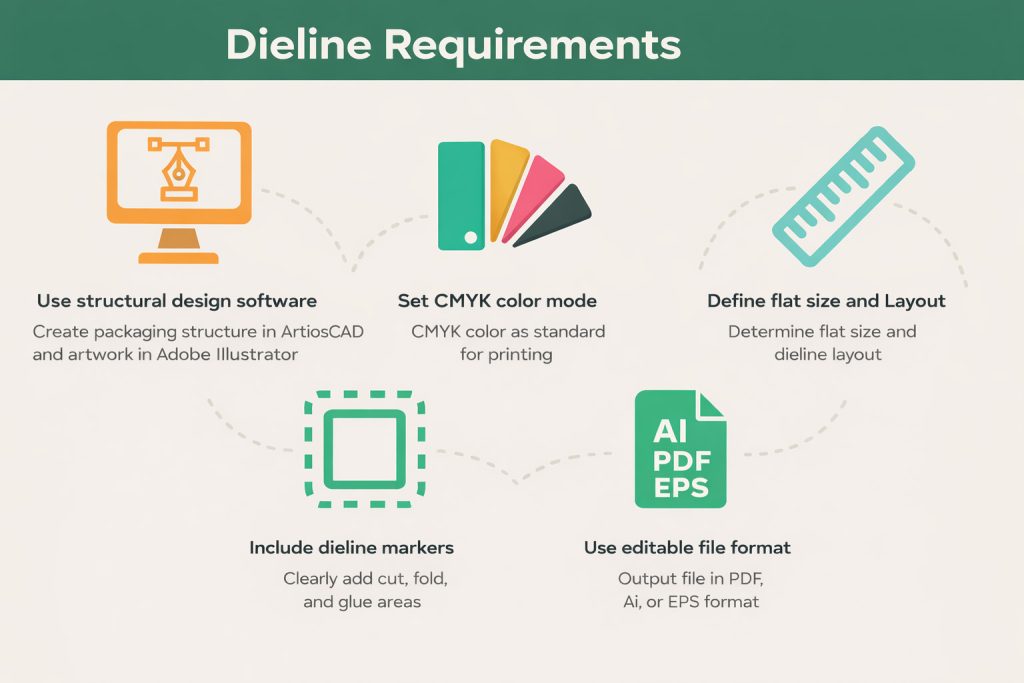
Structural packaging software such as ArtiosCAD is commonly used for technical box layouts.
Adobe Illustrator is widely used for applying artwork after the structural file has been approved.
Some online tools can help with mockups or early concepts, but a production dieline should still be checked against the real material and manufacturing method.
Final artwork is usually supplied in an editable vector format such as AI or print-ready PDF.
Before production, confirm:
- fonts are outlined or supplied correctly
- linked images are included
- colors are prepared for print
- dieline layers remain separate from artwork
- bleed is included
- important text stays inside the safe area
Dieline vs Die Cutting
These two terms are related but they are not the same thing.
The dieline is the approved layout.
Die cutting is the production process used to cut and crease the material according to that layout.
Once the artwork and structure are approved, the dieline is used to prepare the cutting tool or production setup.
Die cutting is the production step that follows the dieline: the approved layout is used to prepare the cutting die that cuts and creases each sheet.
When Is the Dieline Ready for Production?
A finished dieline does not automatically mean the order is ready for mass production.
The normal sequence should be:
Product dimensions → Box structure → Dieline → Artwork → Physical sample → Approval → Bulk production
The sample gives the buyer a chance to check:
- product fit
- insert fit
- opening and closing
- panel direction
- printed position
- finishing
- overall box size
Any structural changes after artwork approval may require the artwork file to be adjusted again.
That is why structure should be confirmed before final print files are released.
Dieline FAQs
What is a dieline in printing?
In printing, the dieline meaning is the same as in packaging: it is the flat outline that shows where the sheet will be cut, creased and folded. Designers place artwork inside this outline, and the print file is produced with bleed extending past the cut lines.
Can I create my own dieline?
You can draft one for early planning, but the dieline used for production should be confirmed by your supplier against the actual box size, material and structure. A supplier-issued dieline keeps your artwork aligned with the real cutting die and avoids costly rework.
Do I need a dieline for digital printing?
Yes. The dieline defines the physical structure of the box, which does not depend on the printing method. Whether the box is printed digitally or offset, the supplier still needs a confirmed dieline to cut, crease and fold each sheet correctly.
What is the difference between a dieline and die cutting?
A dieline is the approved flat layout; die cutting is the manufacturing operation that brings it to life. Once the dieline is confirmed, it is used to make the cutting die that cuts and creases every sheet.
Need a Dieline for Your Custom Box?
Send us your product dimensions, preferred box style, quantity and insert requirements.
We can confirm the structure first, prepare the dieline, check the artwork and move the project into sampling.